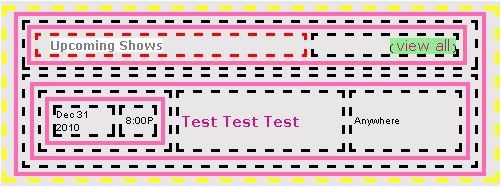
The following diagram shows the band page show section.
To see how this fits into the complete page, see this:Structure, Div/Table/cell layout of the myspace band page
The below diagram is an extract, of the div containing the shows, from the diagram I link to above. The Div (which is the outer structure in this diagram) is two tables deep and in the cell which makes up the right column. This cell is in class td.text
This div, can be addressed as
table table td.text div
![]() |
|
Unless you have added a custom div, to the right column, the only other div elements, effected by the address
table table td.text div
are
1) the empty div in the friendSpace
2) The div of class commentlinks in the comment space
3) The div around the music player (which only showed up recently)
The "Upcoming Shows" header is in class whitetext12.
It is the ONLY element addressed like this:
div table td.text span.whitetext12
(I took a shortcut and started with the div. This can be done if you are certain it is not causing an additional conflict which would not otherwise occur).
If I wanted to be more explicit, thus reducing the potential of conflict I would not leave any layers out of my address:
table table td.text div table td.text span.whitetext12
Leaving out the td between the first two tables does not add any additional risk, since it has no class assigned, and there is ALWAYS a td between two table layers. I leave out the tr for the same reason. It is only when it has a class assigned that it may add value to include it.
The below block styles the shows to look like this:
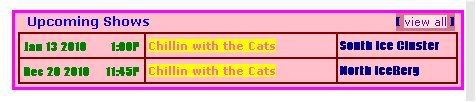
Notice the use of font. One thing my previous diagram missed was the use of the font tag. I did need it in the below style block to get the above.
<span class="off">!-Style Shows-!</span>
<style>
{!-Border around shows table-!}
table table td.text div table {border:3px solid; border-color:magenta;}
table table td.text div table table {border:none;}
{!-background of most of the shows space-!}
table table td.text div table td {background-color:pink; }
{!-form inner borders with background color-!}
table table td.text div table table {background-color:maroon ;}
table table td.text div table table table {background-color:transparent;}
{!-style text-!}
table table td.text div table table td.text span.whitetext12 {color:blue !important; font-size:13px !important;}
table table td.text div table table a {background-color:yellow; color:hotpink}
table table td.text div table table span.whitelink {background-color:PaleVioletRed ; border-bottom:2px PaleVioletRed solid;}
table table td.text div table table span.whitelink a {color:purple !important; background-color:mistyrose !important;}
table table td.text div table table table font{color:green !important; font-size:11px; font-weight:bold}
table table td.text div table table font {color:DarkBlue !important; font-family:Impact !important; font-weight:bold; font-size:12px}
</style>
<span class="off">!-END Style Shows-!</span>
Putting Shows in a A Scroll Box
I no longer recommend doing this at all, due to the div around the music player.
It is not impossible, but I am not sure it is worth it.
In non IE browsers it is really easy
IE is more of a problem.
note to self: write an app to hold the shows, to solve this problem.


16 comments:
Hi E! I need a little help with a band page. I made a contact table for this band:
http://www.myspace.com/intodown
and I made the ct the standard 300px by 150px.
2 questions:
1. From the looks of their page, the default ct on there appears to be wider than 300px. I use ct code generated at BBZ Space. Will this be enough to hide the default ct on there? Or do I need additional code to hide the default ct?
2. I *assume* the code goes in the "Bio" section of the page... or does it matter, as long as it is in between style tags?
Since you have experience with band pages, and I have never seen one, thought you'd know :D
Thank you!
Cx
Their contact table is only 300px wide.
It is not 150 tall.
If they removed or resized the clear gif spacers, the links won't line up.
And if you make it a background, to a table which is not large enough it won't all show.
But you could resize their table to match your background (custom contact table). I don't know what the effect will be. It depends on what else is on their page.
The code is style code, so it can go anywhere, as long as it is not nested in another style block.
The contact table is the same on the standard and artist pages.
It has the same class and same structure.
The ct I made for him is 300 by 150 - how do I "make it work" on there? Not clear here...
Please don't tell me I have to re-make it! lol!
Thanks!
ok,
I won't tell you that you have to re-make it.
I think I answered this on yahoo questions once.
I am pretty certain, looking at this profile, that you can re-size the contact table, to fit your custom table.
I am not sure the links will line up correctly.
They should be close.
I am working on a new myspace page for an artist that has a long list of tour dates. I would like to show only the first 10 shows and then have the button that says "show all" take you to a list that has all of the shows. This will keep my page looking clean and eliminate the need for a scroll box. How would I go about doing this? Thanks so much.
Brooke
www.myspace.com/brooketestsite
i have a problem in my layout, in 2 sections... The Shows, and the Comments ........
I can't seem to put the Background Transparent .. could you help me out on what am I writting wrong
here is my Band TEST page: http://www.myspace.com/madcowmadcow23
thanxxx
This code is apart of the tuturial:
{! for those who want to move the div up BEHIND the ad banner !}
div {position:relative; z-index:9}
div.myCoreDiv, div.myCoreDiv div {z-index:0}
But what do I actually need to do to get the div behind the banner? I don't know what to do with the code. Thanks for your help!
yeah, i want to know that too, how can i change the AD position ??
Mescont
You can move the ad by putting a margin above the body.
<style>
body {margin-top:200px;}
</style>
neal
You can get the div up behind the ad banner with a negative top position value.
Where it has top:0px
you can instead do
top:-Ypx
where Y is the distance you want to go up.
I am having trouble displaying the shows on my page. Is there a particular section that this code goes? myspace.com/redletterreason is my page. Thanks
would you be willing to line up all links and comments for a small fee? I have the whole Div Complete except links and placing comments and friends can you please help?
lp you pay me the small fee, i would gladly do all the Links and anything you need for only $10
email me plzz: sendblink23@gmail.com
i need help!
this is my band profile
http://profile.myspace.com/index.cfm?fuseaction=user.viewprofile&friendID=406309894
where it says upcoming shows i want to get rid of tht and put an image that says "shows"
Can someone please help. I have been trying left and right to get these shows to show. I'm doing a band site myspace.com/doriansdecay and I got everything else to work fine except the shows will not work. What can I do? Can someone send me a code that I can put into my custom div so that they will show up.
Post a Comment